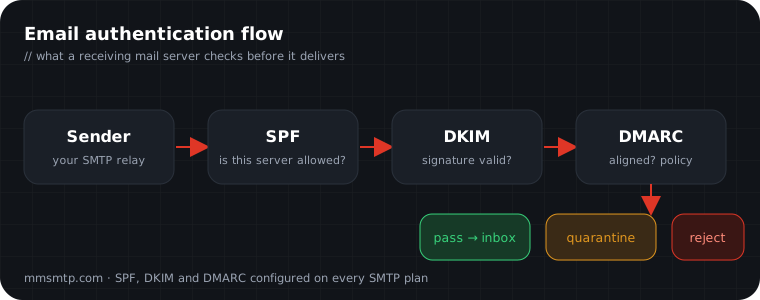
Three acronyms decide whether mailbox providers trust your email: SPF, DKIM and DMARC. Get them right and you clear the first hurdle to the inbox. Get them wrong and even perfectly legitimate mail gets filtered. Here is how each one works, without the jargon.
SPF — who is allowed to send
Sender Policy Framework is a DNS record that lists the servers permitted to send mail for your domain. When a receiving server gets your message, it checks whether the sending server is on that list.
v=spf1 include:_spf.mmsmtp.com include:_spf.google.com ~allThe ~all at the end means "anything not listed should be treated with suspicion." Keep your SPF record to a single line and under ten DNS lookups, or it silently breaks.
DKIM — proof the message wasn't tampered with
DomainKeys Identified Mail adds a cryptographic signature to every message. The receiving server fetches your public key from DNS and verifies the signature. If the body or key headers were changed in transit, the check fails.
selector._domainkey.yourdomain.com TXT "v=DKIM1; k=rsa; p=MIGfMA0GCSq..."DMARC — tying it together
DMARC is the policy layer. It tells receivers what to do when SPF or DKIM fails, and — crucially — it sends you reports showing who is sending mail as your domain.
_dmarc.yourdomain.com TXT "v=DMARC1; p=quarantine; rua=mailto:[email protected]; adkim=s; aspf=s"Start with p=none to monitor, read the reports for a couple of weeks, then move to quarantine and eventually reject once you are confident every legitimate source is aligned.
The order to do this in
- Publish SPF listing every service that sends for you.
- Enable DKIM signing and publish the public key.
- Publish DMARC at
p=noneand collect reports. - Fix any unaligned sources, then tighten to
quarantine, thenreject.
When you order an SMTP relay from us, we configure SPF, DKIM and DMARC for your sending domain as part of setup — so you clear this hurdle on day one. For a deeper look at what happens after authentication, read why emails land in spam.